Use TokenRex with Flowise
Connect Flowise chatflows and agents to TokenRex with ChatOpenAI Custom.
Setup checked against the linked documentation. Screenshots are reference examples from the tool's publisher, not proof of a TokenRex connection. Live execution inside this third-party app has not been tested; verify a short request before running larger tasks.
Before you start
- Flowise installed or a workspace
- Permission to create credentials
- A TokenRex API key
Setup methods
OpenAI Custom Model node
- 1.
Create a chatflow and add OpenAI Custom Model (called ChatOpenAI Custom in older versions).
- 2.
Create a private ChatOpenAI credential with your TokenRex key.
- 3.
Set Model Name to openai/gpt-6-astra. In Additional Parameters, set Base Path to https://tokenrex.ai/api/public/v1, without /chat/completions.
- 4.
Set model capabilities from verified specifications, connect the node to your chain or agent, save and test.
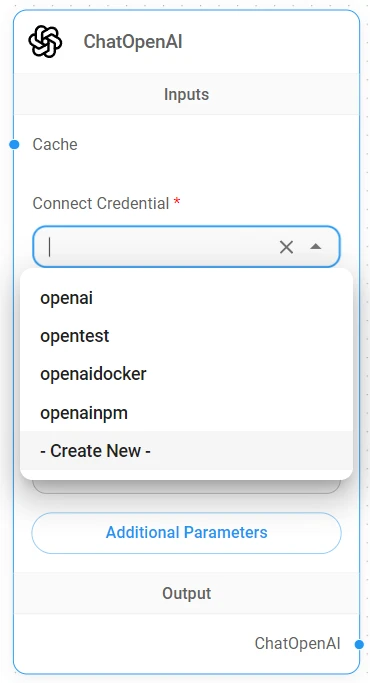
- 1Connect Credential: create a private credential for your key.
- 2Additional Parameters: set the custom Base Path.
ChatOpenAI with a custom Base Path
- 1.
Add the ordinary ChatOpenAI node and use the same private credential.
- 2.
Set Additional Parameters → Base Path to https://tokenrex.ai/api/public/v1.
- 3.
Use this route only if the node allows your exact model ID. Otherwise use OpenAI Custom Model, rather than substituting an unrelated OpenAI model.
Verify the connection
Send a short message with the selected model, read its response, then confirm the exact model appears in your TokenRex usage. Test streaming and tool use separately before larger agent tasks.